
Notes That AI Keeps in Order: From Tiago Forte's Method to a Wiki Run by a Model
Second Brain
15 min readBy Juliusz Tomeczek
The second brain series, episode 2 of 4: the method in the digital world
🎧 Listen to the podcast about this article
On card 9/8,1, Niklas Luhmann wondered how to turn his slip-box into a working partner, a “junior partner”, since working with staff was becoming harder and more expensive. In the first episode of this series I showed how his paper slip-box worked. This episode is about what computers made of his method.
The first ideas for a machine to support human memory are eighty years old. In that time, computers have learned to store notes, search them and link them together. There is one thing they never learned: keeping those notes in order as the pile grows. That job stayed with people, and because it was tedious, many gave up on their note systems just as their collections began to grow. Only a language model can take that work over, which makes it the first serious candidate for the partner Luhmann had in mind. One caveat up front, and I’ll come back to it at the end: handing over the tidying is not the same as handing over the thinking.
My examples come from legal practice, software implementation and sales, because in all three fields, documents, meeting notes and details of what was agreed pile up every day, and people have to go back to them later.
The dream of a machine to support memory
In July 1945, The Atlantic Monthly published Vannevar Bush’s essay “As We May Think” (opens in a new tab). Bush, an American engineer and inventor, described a device called the memex: a desk in which its user would store all their books, records and correspondence, and then consult them at great speed. For its user, he wrote, it would be “an enlarged intimate supplement to his memory”.
Bush’s most important idea was the associative trail. He pointed out that documents are found through indexes, while the mind works differently, moving from one thought to the next by association. So the memex’s user would link documents into trails, and any document could belong to many trails at once. If you read the first episode, you’ll recognise Luhmann’s cross-references in those trails. The links between notes in today’s apps descend directly from Bush’s trails and Luhmann’s cross-references.
Tiago Forte, whose method is the subject of the next section, counts Bush among the pioneers who dreamed of technology that would augment the human intellect. Alongside Bush, he names four others:
- Paul Otlet (opens in a new tab), who from 1895 worked with Henri La Fontaine on an index of facts that eventually passed 15 million entries;
- Doug Engelbart (opens in a new tab), who read Bush’s essay and in 1968 publicly demonstrated the computer mouse and hypertext;
- Ted Nelson (opens in a new tab), who coined the word “hypertext”;
- Alan Kay (opens in a new tab), who conceived the Dynabook, the forerunner of the laptop and the tablet.
Each of them solved a different part of the problem, but none answered the question that Andrej Karpathy, a co-founder of OpenAI, singled out in 2026 as the most important: who keeps all the links between notes up to date?
Tiago Forte’s second brain
The term “second brain” was popularised by Tiago Forte (opens in a new tab), author of Building a Second Brain (opens in a new tab), published in June 2022. Forte came to his method through illness. For years he suffered from throat pain whose cause his doctors could not find. Eventually he gathered all his medical records in one place, described the course of the illness in his own words and listed every treatment he had tried, and only in those notes did he begin to see patterns he had missed. That experience led him to the conclusion on which his book rests: notes let you step back from a problem and see it whole.
Forte’s method has four steps, and the first letters of their names spell CODE:
- Capture. Keep only what moves you, surprises you or might be useful. What you keep usually comes to no more than a tenth of the source.
- Organize. Arrange your notes by the work they will be useful for, not by topic.
- Distill. Pull the essence out of what you have saved, so that the note is still useful six months from now.
- Express. Use your notes in your work and show the result to others.
To organise notes, Forte proposes four categories, which form the acronym PARA: projects, which have a beginning and an end and which you are working on now; areas, which are ongoing responsibilities with no end date; resources, which are topics that may come in handy one day; and archives, which hold everything you are no longer working on. Here is an example from a software implementation: at a workshop with a client, you write down a comment about invoice approval. The note doesn’t go into a “finance” folder but into the folder for the current implementation. When the project ends, you move the notes that will help on the next implementation to resources, and the rest of the folder to archives.
To get at the essence of a note, Forte proposes progressive summarisation. In a saved note, you first put the most important passages in bold, then highlight the most important of those, and finally add a few sentences at the top in your own words. Forte advises summarising a note only when you need it for your work, because summarising takes time and you can’t tell in advance which notes will turn out to be useful.
It’s worth looking at how Forte’s method differs from Luhmann’s slip-box. Luhmann organised thoughts, while Forte organises material for the projects in hand. Luhmann wrote his own permanent notes and linked them with cross-references, while Forte mostly collects passages from sources, files them in project folders and summarises them when they are needed. Both methods are effective, but in each of them a person does all the work.
The weak spot of digital note systems
Note-taking apps delivered what Bush could only dream of: search, one click to reach a related note, and access from your phone. But they didn’t relieve people of the tidying. Someone still has to move a note from a project to the archive, correct a summary when a new source appears, add a link to a note from a year ago and notice when new information contradicts what is already there.
Karpathy (opens in a new tab) put the problem bluntly: “Humans abandon wikis because the maintenance burden grows faster than the value.” By a wiki he means a collection of linked pages of notes. Reading and thinking are enjoyable, while keeping notes in order is a chore. When the tidying is put off for a few weeks, the notes drift away from reality, nobody trusts them any more, and the whole system soon turns into an ordinary folder of files.
Forte published his book a few months before ChatGPT launched, so in his method a person does every step. That isn’t a criticism of Forte, just a reminder of when his method was developed.
The model as a partner
In April 2026, Karpathy published a short note called “LLM Wiki” (opens in a new tab). In it he described how a language model can take over the very tidying that makes people give up on their notes.
The easiest way to see the difference between an ordinary chat with a model and Karpathy’s pattern is through an example from sales. An ordinary chat goes like this: after five meetings with a client, you paste five transcripts into the chat and ask what was agreed about the delivery date. The model reads all five transcripts and puts together an answer, and when the conversation ends, none of that work remains. For the next question, the model reads all the transcripts again from the beginning.
In Karpathy’s pattern, the model reads each transcript only once, right after the meeting. It immediately adds the details to a page it keeps for that client: what was agreed, the dates, the promises made by each party, the objections raised and who makes the decisions. If the client changes their mind about the scope of the order, the model records the change on that page. Before the next meeting, you can open the page or ask the model what was promised and what is still outstanding.
The pattern has three layers. Sources are the transcripts, documents and articles you collect, and nobody changes them, not even the model. The wiki, a set of linked pages holding the knowledge drawn from the sources, is run by the model, which writes and updates those pages. The rules file is yours to write. In it you describe how the model should run the wiki: which pages to create, what to call them and what to do with a new source. You work with these layers in three ways: you add a source, you ask the system a question, and you periodically have the model review the wiki, looking for contradictions and for pages that no link leads to.
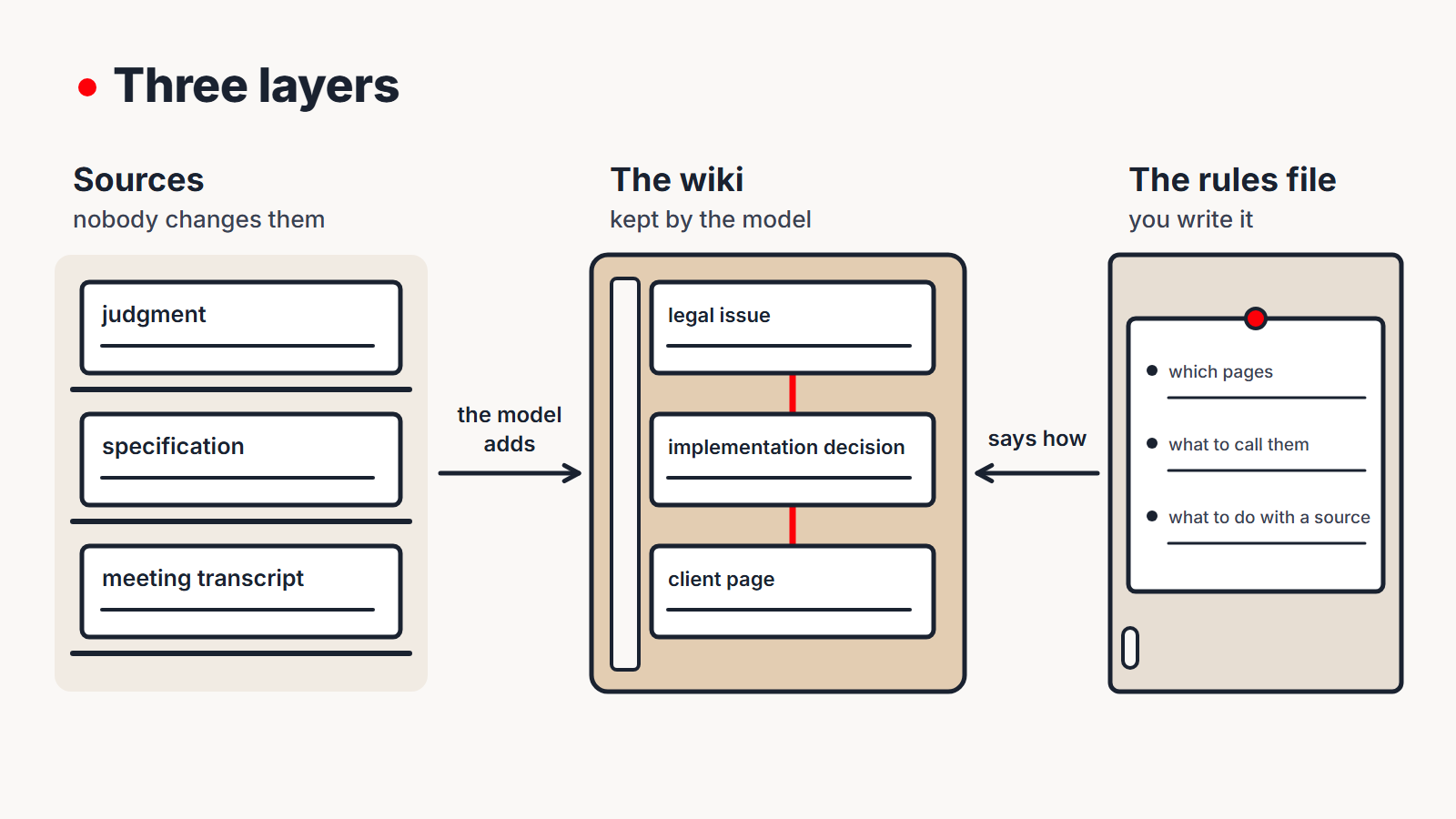
I describe the pattern in full, along with how it has worked for me over several months of daily use, in Karpathy’s LLM Wiki: a second brain the model keeps up to date on the JT CONSULTING website.
One pattern in three fields
The same arrangement works in any job where knowledge arrives from many sources and you need it to hand a month or a year later.
| Field | Sources nobody changes | Pages the model keeps | Question for the system |
|---|---|---|---|
| legal practice | judgments, case commentaries, case documents | legal issue, case law on a given point, case | “Which judgments from the last two years contradict my argument?” |
| software implementation | specification, workshop notes, client documentation | system module, decision with its reasons, open issues | “Why did we choose two levels of invoice approval, and who signed that off?” |
| sales | meeting transcripts and notes, proposals, correspondence | client page, what was agreed, objections, decision-makers | “What have we promised this client, and what is still outstanding?” |
In each of these fields, the model does the same thing: it keeps the pages and flags contradictions between sources. What differs is the material and what the model’s work gives you:
- Legal practice. The model keeps a page on a legal issue and adds every new judgment to it. When a new judgment contradicts earlier ones, the model flags the contradiction, so you can see where the case law is divided.
- Software implementation. The model keeps a knowledge base for the project, in which every decision has a page with its reasons and date. When something agreed at a workshop contradicts the specification, the model flags the contradiction on the decision’s page, so the discrepancy comes to light straight away rather than when the client comes to sign off the system. Those pages also make it easy to put together the implementation documentation later.
- Sales. The model keeps a client page that collects what was agreed in each conversation, so you don’t have to remember every detail from a dozen or more meetings. When a client changes their mind, the model records the change on the page.
Luhmann, Forte and Karpathy side by side
Decades separate these three methods, but they answer the same questions. The main difference between them is who does the work.
| Luhmann’s slip-box | Forte’s second brain | Karpathy’s wiki | |
|---|---|---|---|
| Where a source goes | bibliographic slip-box | resources in PARA | sources nobody changes |
| Where a thought goes | card in the main slip-box | summarised note | wiki page |
| How notes connect | number and cross-reference | project folder | links added by the model |
| Where a search starts | keyword index | search box and folders | list of pages |
| Where the rules live | in Luhmann’s head | in the book | in a rules file that grows with the system |
| Who keeps things in order | Luhmann | you | the model |
| Who does the thinking | Luhmann | you | you, with the model as your partner |
Who should write the notes?
Karpathy says: “You never (or rarely) write the wiki yourself.” The model does all the editing, and the human chooses the sources, asks the questions and thinks about what the knowledge adds up to. Sönke Ahrens, whose book the first episode was based on, takes the opposite view and quotes the learning researcher Terry Doyle: “the one who does the work does the learning”. At first glance, Karpathy and Ahrens contradict each other. If the model writes everything, who is learning?
I think Karpathy and Ahrens are both right, because they are talking about different things. Karpathy is talking about memory: summarising sources, adding links, keeping the list of pages and catching contradictions. This work is like bookkeeping: tedious but necessary. A model does it better than a person because it doesn’t get bored and doesn’t forget. Ahrens is talking about understanding, and the only way to reach it is to build an argument of your own: when you put the argument into words yourself, you really understand what you are writing about.
So I suggest a simple division of labour. Hand the bookkeeping over to the model, but when a note sets out your own argument, write it yourself, like the permanent notes in the exercise from the first episode. The model summarises a new judgment and adds it to the page on the legal issue, but you decide whether that judgment changes your position in the case at hand. The model pulls everything agreed and all the dates out of a transcript, but you work out whether the client is ready to decide and what to propose at the next meeting.
Without this division, a second brain gives you memory but not understanding, as I wrote in the first episode. With it, you get both.
What to watch out for
Models write fluently, so an inference sounds like a fact. A claim the model worked out for itself, rather than read in a source, sounds just as confident as one that has been checked. On important pages, ask the model to name the source of each claim, and treat anything no source supports as a hypothesis.
Leave the sources as they are. Only an untouched source lets you check whether a wiki page matches what the source says. If the model corrects a transcript or a specification, you lose the original you could have compared the page with.
Some sources belong to someone else. Case files, client documentation and meeting transcripts contain other people’s information, often including personal data. Before you send them to a model, check that your agreement with the client and the terms of the service you use allow you to do so.
An exercise for the week: your rules on one page
Before you install any software, write the rules that a model keeping your notes would have to follow. That one page of rules will be the starting point for building a second brain in the third episode, and you don’t need any tools to write it.
- Types of notes. List the types of notes you keep, for example on cases, legal issues and judgments; on implementation projects, decisions and open issues; or on clients, meetings and proposals.
- Names. Decide how you will name each type of note, so that a year from now you can go straight to the right one without digging through folders.
- New sources. Describe in a few sentences what should happen when new material arrives: which pages need updating and what to add to the list of pages.
- What must not change. List the sources the model must not correct.
- What you write yourself. Name the notes you never hand over to the model: arguments, assessments and conclusions.
- Test the rules in your daily work. For a week, after everything you read and every meeting, ask yourself whether the rules tell you where that material should go. If they don’t, add the missing rule.
Writing the first version of the rules takes about half an hour. That’s my own estimate, not a research finding. After a week of corrections, the page describes the way you actually work, not a general template from a handbook.
What’s next
In the third episode we’ll build a second brain, starting with an empty folder and ending with the first question the system answers better than an ordinary file search. We’ll work from the page of rules you write in this exercise. I’ll send the next episodes out in the newsletter. Sign up for the newsletter so you don’t miss them.
Sources
- Andrej Karpathy, “LLM Wiki” (opens in a new tab), 4 April 2026.
- Tiago Forte, Building a Second Brain (opens in a new tab), Atria Books, 2022.
- Vannevar Bush, As We May Think (opens in a new tab), The Atlantic Monthly 176 (1945), no. 1, pp. 101–108.
- Sönke Ahrens (opens in a new tab), How to Take Smart Notes. One Simple Technique to Boost Writing, Learning and Thinking (opens in a new tab), second edition, 2022.
- English translation of Niklas Luhmann’s card sequence 9/8: zettelkasten.de (opens in a new tab), 31 October 2022.
This text was written with the help of artificial intelligence tools, because that’s how I work every day and what I teach. I have checked every claim in it and I put my name to each one. The cover and diagram are vector graphics saved as code, which was also written with the help of AI. The conversation in the recording was generated by NotebookLM from this text, and I listened to it before publishing.
Juliusz Tomeczek, AI for Everyone

About the author
Juliusz Tomeczek
My name is Juliusz Tomeczek. I run the AI for Everyone blog and publish articles here about artificial intelligence.
Related articles
14 min read
The Zettelkasten, Step by Step: Luhmann's Method Before Apps and AI
Long before note-taking apps, Niklas Luhmann kept a slip-box of 90,000 cards that he himself called a second memory. How it worked, what notes he wrote in it, and how to try the method on paper in a week.
- #Second Brain
- #AI for Lawyers