
How to Build a Second Brain Step by Step: From an Empty Folder to Your First Question
Second Brain
17 min readBy Juliusz Tomeczek
The second brain series, episode 3 of 4: building it step by step
🎧 Listen to the podcast about this article
I ended the second episode of this series with an exercise in which you write, on a single page, the rules for a language model that keeps your notes in order. In this episode we’ll use that page to build a working system. We’ll start with an empty folder and finish with the first question the system handles better than a file search. You’ll then check the answer against its source.
Once you have worked through the five steps in this episode, you’ll have a small second brain with its first pages, written from a few of your own documents. It’s a beginning, not a finished system. The rules file grows as you work: every week you add rules that you can’t foresee today. Andrej Karpathy, whose pattern I described in the previous episode, says as much himself: his “LLM Wiki” note sets out a general idea, and you work out the details as you go, with your own agent. Here I’ll show one possible route from that idea to your first wiki pages.
My examples come from the same three fields as last time: legal practice, software implementation and sales.
Don’t have your page of rules from the last episode?
Write a short version by answering three questions. What types of notes do you keep, for example notes on cases and judgments, on decisions made during an implementation, or on clients? Which material must the model never change? Which notes do you only ever write yourself, because they set out your own argument or assessment? You’ll fill in the rest of the rules in step 2.
What you’ll need
You only need three things:
- A folder of ordinary text files. The pages are Markdown files: plain text with simple markup for headings and links. The files stay on your own disk rather than on a software company’s servers: you can open them in any editor, and if you switch programs, you can take them with you without losing anything.
- A program for reading your notes. In my examples I use Obsidian. It shows the pages together with their links and draws a graph of the connections between them. It’s free for personal and work use and doesn’t require an account; you only pay for extras such as syncing between devices. You can use any other program that reads Markdown files instead.
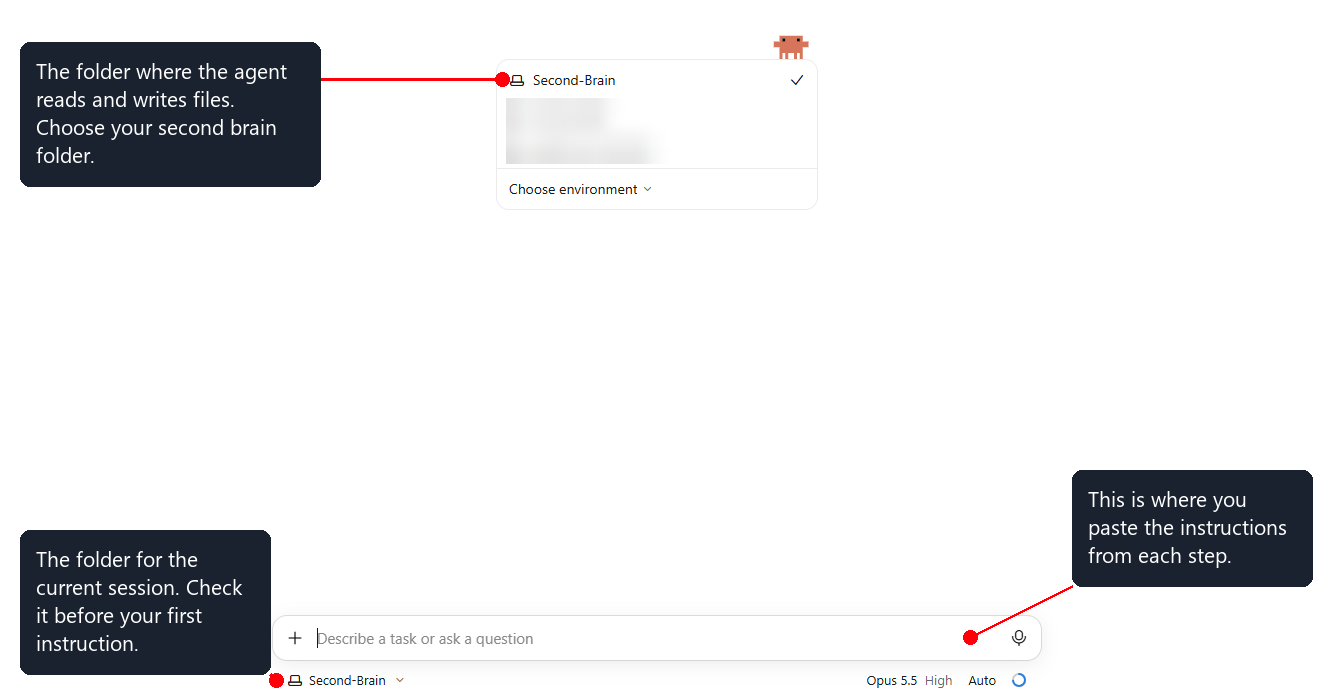
- An agent that reads and writes files on your computer. In my examples I use Claude Code. Karpathy names several tools of this kind, including Codex and OpenCode, and the steps in this episode don’t depend on any one of them. An ordinary chat in a web browser won’t do, because it can’t save files to your folder. Claude Code doesn’t require the command line: it also runs in the Code tab of the Claude desktop app, where you choose the folder the agent will work in. You need a paid plan, because a free account doesn’t include Claude Code. The cheapest plan, Pro, costs $20 a month, or $17 a month if you pay for a whole year up front. Both prices exclude tax (pricing as of November 3, 2026).
This is how you choose a folder in the Claude desktop app:
Before you start. Build your first system from material that isn’t confidential. I explained why in the “What to watch out for” box in the previous episode: case files, client documentation and meeting transcripts contain other people’s information, often including personal data. Public material or your own is enough for learning. In a law firm, use judgments from a public database rather than case files; on an implementation, use your own notes on the product documentation rather than the client’s documents; in sales, use published industry reports rather than meeting transcripts.
Step 1: a folder with three layers
You know the three layers of Karpathy’s pattern from the previous episode: sources that nobody changes, a wiki kept by the model, and a rules file that you write. In this step each layer gets its own place in the folder. Karpathy adds two supporting files: an index of all the pages, where the model starts every search, and a log, in which the model records what it changed and when. I add one more folder, for notes that set out your own argument, because in the previous episode we agreed that you don’t hand those notes over to the model.
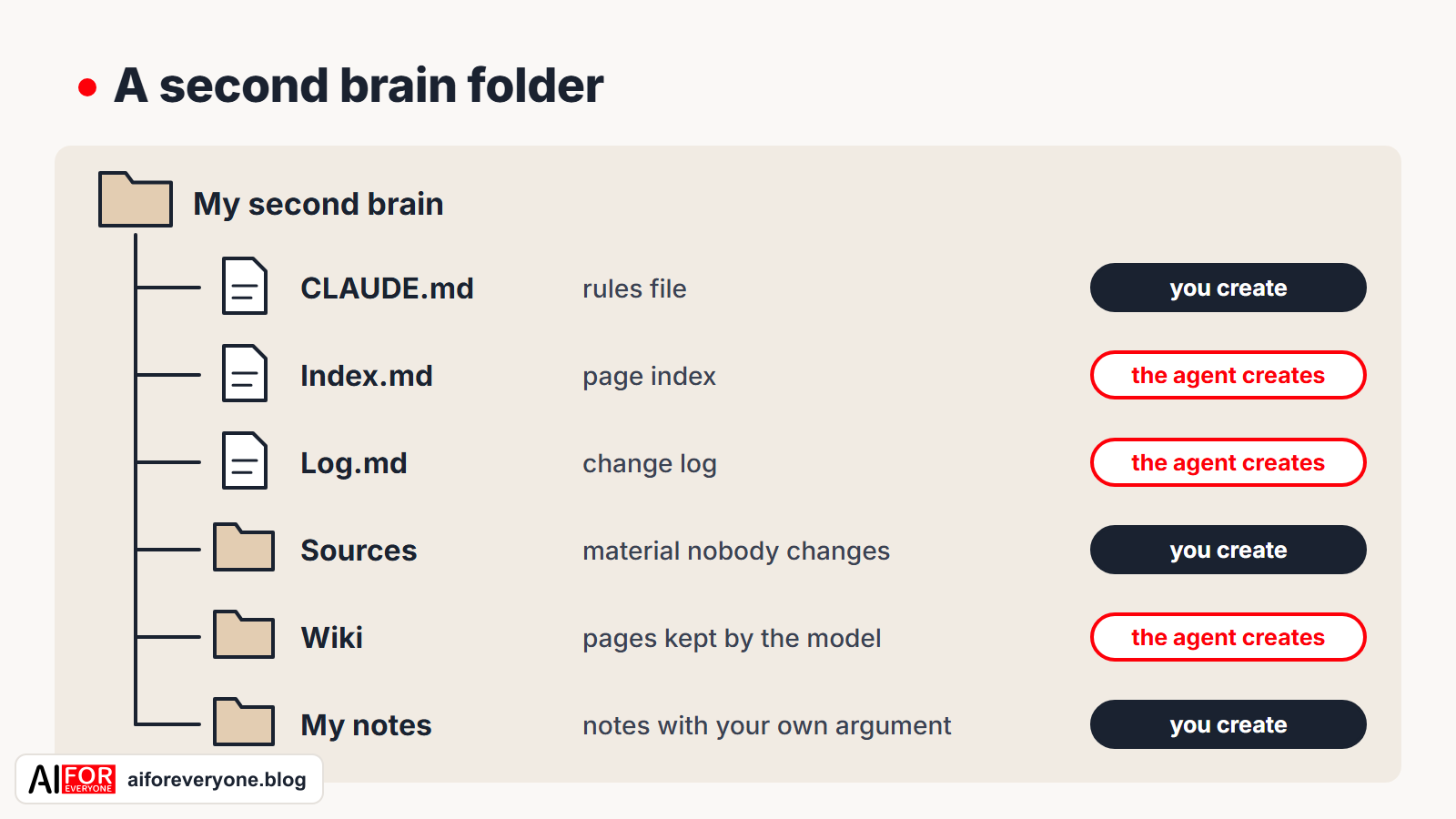
You only create the main folder and two subfolders by hand: Sources and My notes. You’ll write the rules file in step 2 by copying your page of rules into it. The agent will create the Wiki folder, the index and the log, but only once you have approved the page types it proposes in step 2.
Step 2: your page of rules becomes a rules file
At the start of every conversation, Claude Code loads the CLAUDE.md file from the folder it is working in and treats its contents as rules. Other tools look for a file like this under a different name; Codex, for example, reads a file called AGENTS.md. Create a rules file in the main folder, under the name your agent looks for (in Claude Code, that’s CLAUDE.md), and copy your page of rules into it. Once you have saved it, open the file again and check that the headings start with # and the list items with -. When I recorded myself working through the steps in this guide, Windows Notepad saved the file with a backslash in front of every heading and list item, and inserted blank lines throughout the text. The agent worked anyway, but in Obsidian, headings like these look like ordinary text. The simplest way to avoid this is to create the rules file in Obsidian as a new note called CLAUDE, because Obsidian adds the .md extension itself.
The page from the previous episode described the way you work. The agent needs a few more rules, and without them it will soon make a mess. Some of them I didn’t discover until a trial run I did in an empty folder before writing this episode. The template below combines the points from your page with those rules. Copy it and fill in the parts in square brackets.
Rules file template to copy
# Rules for my second brain

My field: [your field].

## Folders
- Sources/: material you never change, move or delete.
- Wiki/: pages that you maintain.
- My notes/: my own notes with my arguments and assessments. You may read them, but you never write in them.
- Index.md: a list of all wiki pages, with a one-sentence description of each.
- Log.md: a dated record of every change, with each new entry added at the end of the file.

## Page types
- [type 1]: [how to name the file]
- [type 2]: [how to name the file]
- [type 3]: [how to name the file]
- Answer: a saved answer to one of my questions, with the question quoted in the first paragraph.

## Every page
- Every claim links to its source in the form `[[Sources/file-name]]`.
- A claim that no source supports is marked with the word "inference."
- Every page ends with a section called "What we don't know."

## Changes
- When a new decision is made, do not delete the old one: mark it as superseded and say which decision superseded it.
- A contradiction between sources is flagged on every page it affects.

## Three tasks
- New source: read it, show me the key findings, update or create pages, and update the index and the log.
- Question: start with the index, answer with links to pages and sources, and say what you don't know.
- Review: list contradictions, pages without links and claims without a source. Don't fix anything until I approve the list.
A rules file doesn’t guarantee that the agent will always follow the rules in it. The Claude Code documentation explains that the agent treats the contents of this file as guidance it takes into account, not as settings it must obey without exception, and that the shorter and more specific the rules are, the more consistently it follows them. That’s why the template is made of short sentences.
Now for your first instruction to the agent. The key part is the last line, because it stops the agent from creating anything before you decide which page types to set up:
Read the CLAUDE.md file in this folder. My field: [your field].
Suggest which types of pages this wiki should have, give one example of each type, and point out what is missing from my rules.
Don't create anything yet. Show me the proposal first, we'll discuss it, and then I'll decide which page types to set up.
In my trial run, the agent didn’t create a single file after this instruction, but it proposed ten page types and pointed out more than a dozen gaps in the rules. Each time I repeated the step, the numbers changed (one run gave nine types and fourteen gaps), because the agent draws up the proposal from scratch on every run. That’s too many page types to start with. Choose the three you’ll need most often, and add the others when later sources call for them. In my trial run the agent worked through four sources, and three page types were enough for all of them. The fourth type, for saved answers, only became necessary when I asked the first question. I put it in the template from the start, so that you don’t have to add it in step 4.
The agent may also ask you a few multiple-choice questions and mark one answer to each as recommended. During the recording I chose the recommended answers, and the agent replaced the four page types in the rules file with nine, dropping the type for saved answers in the process. The agent didn’t put it back until I asked the first question. So after every change to the rules that the agent proposes, open the rules file and read what it actually says.
This is what the end of the reply looked like when I repeated the step:
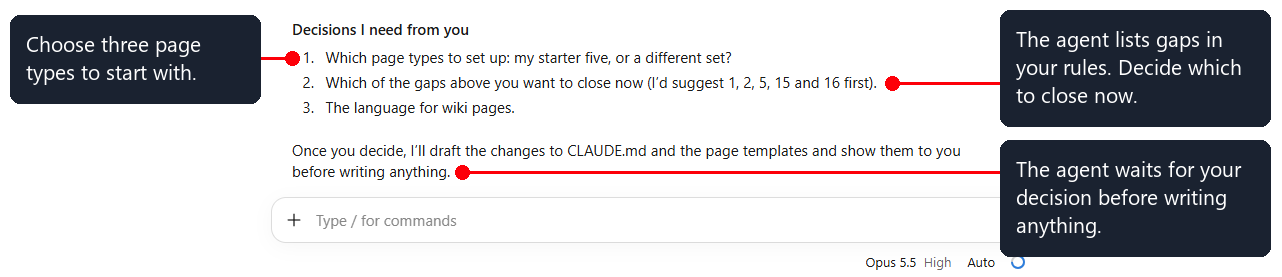
Once you have chosen three page types, add them to the rules file and tell the agent: “Set up the structure according to the rules.” The agent will create the Wiki folder, the index and the log. At this point, check the folder names as well. During the recording, I misspelled the name of the sources folder in step 1. The agent created a second, correctly spelled folder next to it and reported that the structure was ready, but it didn’t mention the misspelled folder.
Step 3: the first source, and only one
Before the agent changes anything else, make a copy of the whole folder. Copying it elsewhere on your disk is enough. With a copy, you can undo any change, and in the first days of working with the system you will certainly need to.
Karpathy writes that he prefers to add sources one at a time and keep an eye on what the model is doing. He reads the summaries, checks the changes and guides the model on what to focus on. I think this is the most important piece of advice in the whole episode. It matters most when you’re just starting out with the system. Don’t drop fifty files into the folder at once. Add one source, give one instruction and read everything the agent has produced.
| Field | First source | What should be created | What you check |
|---|---|---|---|
| legal practice | one judgment from a public case-law database | a page on the legal issue and a page on the judgment | whether the summary matches the judgment and gives the judgment’s case number |
| software implementation | your notes on the product documentation or your own description of one process | a page on a module and a page on the first decision with its reasons | whether the reasons come from the source, not from the model |
| sales | your own notes on the industry or a published report | a page on the industry and a page on clients’ typical objections | whether the objections are in the source or the model added them |
Copy the source file into the Sources folder and keep the original outside the second brain folder. Then give the instruction to process the source:
Process the new source Sources/[file name] according to the rules. Before you save any pages, show me the key findings.Once the agent has processed the first source, check three things:
- The source file hasn’t changed. Open it and compare it with the original that you keep outside the second brain folder.
- Every new page links to the source, and claims that aren’t in the source are marked as inferences.
- The index and the log have been updated.
This is what a wiki page with links to its source looks like in Obsidian, with the graph of connections next to it:
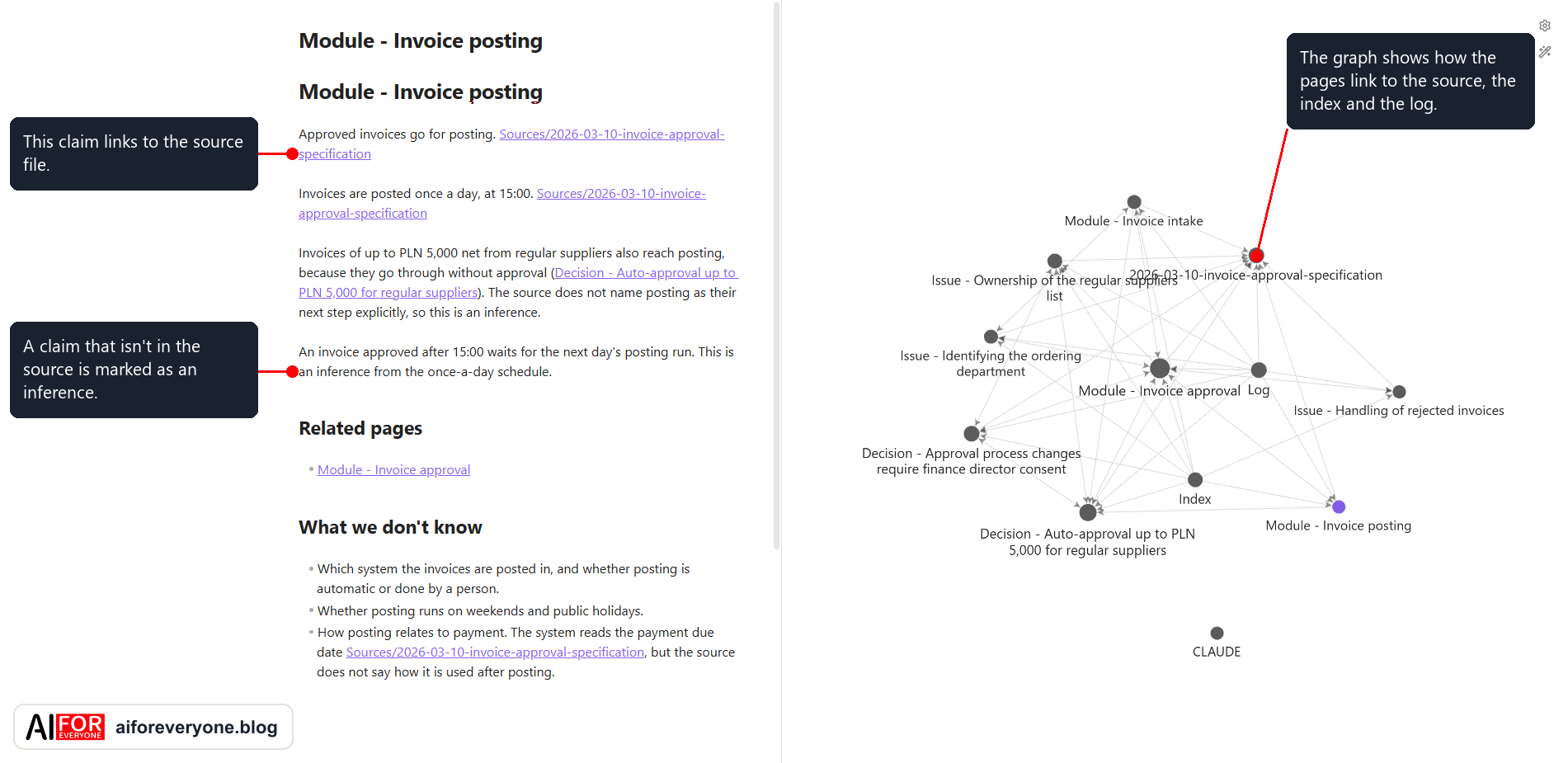
Don’t be surprised if the pages multiply faster than the sources. In my trial run, four short documents totaling 333 words produced eleven pages, because the model creates separate pages for decisions, modules and open issues. On each of them, it also notes what isn’t known yet.
Karpathy’s advice to add one source at a time goes with a rule I always stick to: don’t trust a report that says “done”; open the files. The agent says “done” in the same tone whether the task worked or not. I have seen this many times in my own work. One of the sources in my trial run was a short message about two things: the times at which invoices are posted, and a new threshold amount for invoice approval. The model treated the first matter as settled and the second as still open. It marked both assessments as its own inferences. Places like these, where the model settles something on its own, are the ones you have to read yourself. A report saying “done” tells you nothing about them.
Step 4: three more sources and the first question
Add the next three sources, each with a separate instruction, and run the same check after each one. With four sources you can already see the difference between the system and a file search. A file search finds a word, while the system answers a question that requires combining information from several sources.
| Field | First question for the system |
|---|---|
| legal practice | “How do the judgments I’ve added differ in their view of [the legal issue], and which of them is the most recent?” |
| software implementation | “Why did we choose two levels of invoice approval, who signed off on that, and what threshold applies today?” |
| sales | “Which client objections come up in more than one source?” |
A good answer meets two conditions. First, for every part of the answer, it names the pages and sources that part comes from. Second, it says plainly what the system doesn’t know.
Compare two ways of finding the answer: type the key phrase from the question into your operating system’s file search, and ask the agent the whole question. Then check the agent’s answer against the sources. In my trial run, the file search found the phrase “two levels” in one of the four documents, the workshop notes. They gave the reason for the decision, but they said nothing about who approved it, and nothing about the later request to change the threshold amount, which was in another document. The agent put together information from three documents, and when I also asked who approves invoices while the finance director is away, it replied that this wasn’t known. That answer was correct, because no source named anyone to stand in for the director.
I should add a caveat here: I wrote the sources for this trial run myself, with this question in mind, and a person can read four short documents in a few minutes. The example shows how the system works, not how big the agent’s advantage over a file search is. With four sources the advantage can be small, and it grows with every new one. That’s my own observation, not a measured result.
Save an answer worth keeping as a new page. Karpathy advises saving good answers in the wiki, so that the work that went into them doesn’t disappear with the conversation. All it takes is the instruction: “Save this answer as an Answer page.” The next time a similar question comes up, the model will start from that page instead of putting the answer together again.
Step 5: the first review and the first change to the rules
Once the agent has processed four sources, it’s time for a review. Give the review instruction:
Review the wiki according to the rules and list contradictions, pages without links and claims without a source.
Don't fix anything. Show me the list, and I'll decide what to change.
Before the review in my trial run, I deliberately added a page with three faults: it made a claim with no source, it had no links, and it wasn’t listed in the index. I wanted to see whether the review would find it, and it did. It also caught a mistake made by the model itself: one of the pages referred to “decisions from May 2026,” although the first of them had been made on April 16. The model had put two decisions from different days under one date and hadn’t marked that date as its own inference.
This brings us to something guides usually don’t mention: every mistake the model makes points to a rule worth adding to the rules file. A corrected sentence fixes one page, while a new rule protects every page that follows. The rule about marking inferences, which I put in the template, came from exactly this mistake. Just remember that a rule applies from the moment you add it. Pages written before then need to be reviewed separately, as the model itself pointed out in my trial run.
This is what adding rules can look like in each of the three fields. The first example comes from my trial run, and the other two show how to phrase a rule:
- Software implementation. A page puts decisions from different days under one date. Rule: “A claim that no source supports is marked with the word ‘inference.’”
- Legal practice. A page on a legal issue gives a case number that isn’t in the judgment you added. Rule: “Copy the case number and date of a judgment only from the source.”
- Sales. A client page lists an objection that the client never raised. Rule: “Record a client’s objection together with a quotation from the source.”
In my case, the rules file gets longer after every week of this kind of work, and fewer corrections are needed. But that’s an observation from my own system, not a measured trend.
The most common mistakes
Too many sources at once. Fifty files added in one day produce dozens of pages that nobody reads, and the mistakes in them go unnoticed for a long time.
Handing your own arguments to the model. The model summarizes and organizes the material, but you form the assessments and conclusions. In the previous episode we agreed that you keep your own notes separate from the pages the model maintains. Without that division, the model will write your assessments and conclusions for you, and the system will remember the material but won’t help you understand it.
No copy before the first changes. Without a copy, you can’t undo a change that turns out to be wrong.
Fixing pages by hand without a new rule. If you only correct a page and don’t add a rule, the same mistake will come back with the next source.
Starting with confidential material. Build your first system from public material or your own, and add confidential material only when your agreement with the client and the agent’s terms of use allow it.
An exercise for the week: five sources in five days
- One source a day. Choose five documents you’re actually working on, as long as they aren’t confidential, and add one a day.
- One question a day. Ask the system a question you actually want answered, and check the answer against the source.
- One rule on Friday. Go through the mistakes from the whole week and add at least one rule to the rules file.
After a week you’ll have several answers you have checked and a rules file that already describes the way you work. With those in hand, you’re ready for the next episode.
What’s next
In the fourth episode I’ll show how to use a second brain day to day: how to add sources, ask questions and run reviews as a weekly routine, so that the system doesn’t fill up with out-of-date pages. I recorded myself working through the five steps in this episode and timed the whole run. Doing all the steps with four short documents took me about 40 minutes. That doesn’t include installing the software or writing the page of rules, because I already had mine. For a first attempt, including installation and careful reading of the pages, set aside an afternoon. I didn’t time a first attempt, so an afternoon is my estimate, not a measurement.
If you would rather build a system like this as a team or with someone’s help, the JT CONSULTING website describes the service I offer for setting up a second brain. I’ll send the next episodes of the series out in the newsletter. Sign up for the newsletter so you don’t miss them.
Sources
- Andrej Karpathy, “LLM Wiki,” April 4, 2026.
- Earlier episodes of the series: Zettelkasten step by step and Notes That AI Keeps in Order.
- Anthropic, Claude Code documentation and pricing, as of November 3, 2026.
- Obsidian, pricing and license terms, as of November 3, 2026.
This text was written with the help of artificial intelligence tools, because that’s how I work every day and what I teach. I have checked every claim in it and I put my name to each one. Before writing this guide, I worked through all its steps in an empty folder with made-up documents, and the lessons from that trial run are part of the text.
Juliusz Tomeczek, AI for Everyone

About the author
Juliusz Tomeczek
My name is Juliusz Tomeczek. I run the AI for Everyone blog and publish articles here about artificial intelligence.
 Websites I builtJT CONSULTINGI run AI training courses for companies, build websites and handle their SEO.jt-consulting.pl (opens in a new tab)
 Websites I builtDigital Mentors HubI built a website for an AI transformation expert and set up a server for their open-source tools.digitalmentorshub.com (opens in a new tab)
 Websites I builtSmaczakiI built and still maintain the wholesale website for an importer of meat-based dog treats.smaczaki.pl (opens in a new tab)
 Websites I builtSpretechI built the website for a spring manufacturer in Katowice and handle its SEO.spretech.com.pl (opens in a new tab)
Related articles
15 min read
Notes That AI Keeps in Order: From Tiago Forte's Method to a Wiki Run by a Model
Computers learned to store and search notes, but keeping them in order was still a human job. This article explains what Tiago Forte's method added to note-taking, what Andrej Karpathy's pattern changes, and which notes are still worth writing yourself.
- #Second Brain
14 min read
The Zettelkasten, Step by Step: Luhmann's Method Before Apps and AI
Long before note-taking apps, Niklas Luhmann kept a slip-box of 90,000 cards that he himself called a second memory. How it worked, what notes he wrote in it, and how to try the method on paper in a week.
- #Second Brain
- #AI for Lawyers