
How to Use a Second Brain Every Day: Sources, Questions, and a Weekly Review
Second Brain
16 min readBy Juliusz Tomeczek
The second brain series, episode 4 of 4: everyday work
🎧 Listen to the podcast about this article
I ended the third episode of this series with an exercise: five sources in five days, one question a day, and one rule added to the rules file on Friday. If you have done that exercise, your second brain has a dozen or so pages, several answers you have checked, and a rules file that is longer than it was a week ago. In this episode I’ll show you what to do next so that the system is still useful to you three months from now.
Building a second brain is easier than keeping one going. Andrej Karpathy writes in his “LLM Wiki” note that people abandon their knowledge bases because the work of maintaining them grows faster than the value they give back. The tiring part isn’t the reading or the thinking but the upkeep: fixing links, bringing summaries up to date, noting that new information contradicts old. In Karpathy’s pattern a language model does that upkeep. He leaves four jobs to the human: choosing sources, directing the analysis, asking good questions, and thinking about what it all means.
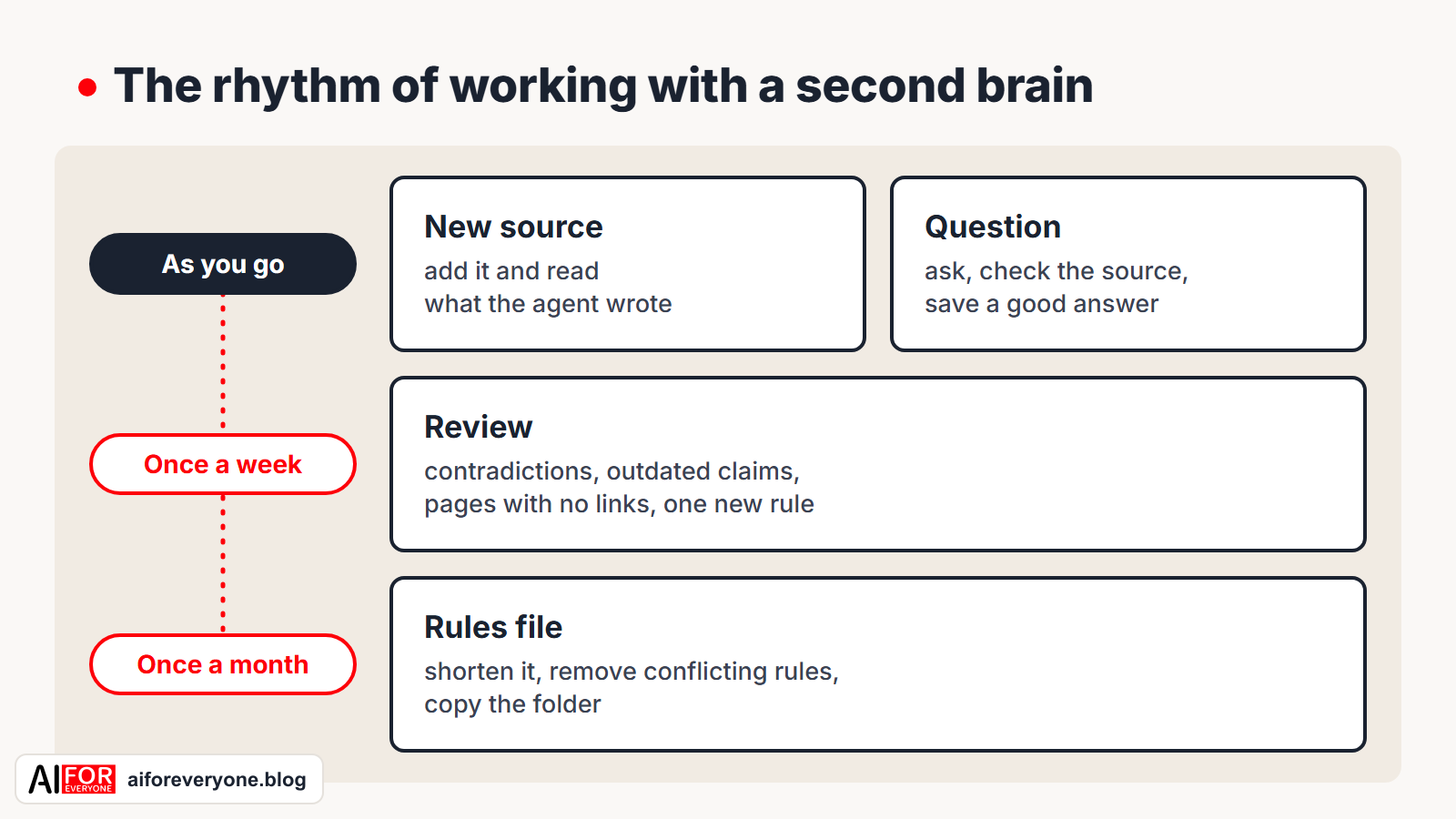
Those jobs are easy to neglect, though. You add sources in bulk and don’t read the pages the agent writes from them. You take your questions back to a search engine because it’s quicker. You don’t run a review, so after two months half the pages describe how things used to be, not how they are. That’s why I suggest a simple rhythm: you do two tasks as you go, a third once a week, and a fourth once a month.
My examples come from the same three fields as in the earlier episodes: legal practice, software implementation, and sales.
The rhythm in one table
| When | Task | How long it takes | Why |
|---|---|---|---|
| as you go | you add a source and read what the agent wrote from it | a few minutes per source | so that knowledge goes into the system when you acquire it |
| as you go | you ask a question and save an answer worth keeping | a few minutes | so that the system works for you instead of just growing |
| once a week | you ask for a review and decide what to fix | about half an hour | so that out-of-date pages don’t pass for current ones |
| once a month | you tidy up the rules file and back up the folder | about half an hour | so that the rules stay short enough to follow |
The times in the table come from my own work. Treat them as estimates, because they depend on how many sources you add and how long your documents are.
As you go: sources
In the previous episode we added sources one at a time and checked three things after each: that the source file hadn’t changed, that the pages had links, and that the agent had updated the index and the log. That rule still applies in everyday work, but two questions come up that you didn’t have to ask with the four documents from the previous episode.
The first question: what deserves a place in the system at all. Not every document that passes through your hands is a source. I use a simple test: three months from now, will I want to ask about something in this document? If so, the document goes into the Sources folder. If not, it stays where it was. A system that takes in everything gives worse answers, because the important findings get lost among the incidental ones.
| Field | Worth adding | Better left out |
|---|---|---|
| legal practice | a judgment you rely on, a commentary on a provision, your own note analyzing an issue | judgments the search engine returned but that you don’t rely on |
| software implementation | a note from the meeting where a decision was made, a process description, a change request | all the emails about meeting times |
| sales | a note after a client call, an industry report, objections raised to a proposal | competitors’ marketing material collected “just in case” |
The caveat from the earlier episodes still applies: add confidential material only when your agreement with the client and the agent’s terms of use allow it.
The second question: when you may add several sources at once. Karpathy writes that he prefers to add sources one at a time and keep an eye on the model’s work, but he also allows for adding many sources at once with less supervision. He advises working out your own approach and writing it down in the rules file. Here’s mine: I add each source of a new type on its own, and I batch only the types the agent has already handled well. If the agent has processed ten meeting notes correctly, you can add the eleventh and twelfth together. Add your first contract, first report, or first transcript on its own, and read every page the agent wrote or changed because of it.
You don’t have to read every changed page after adding each source, though, because there would be too many. Karpathy notes that after a single source is added, the model may change ten to fifteen wiki pages. Two quick checks are enough to keep track of the changes. Ask the agent to show you the key findings before it saves any pages, as in the instruction from the previous episode. Then open the log and see which pages the agent changed. Open the pages themselves only if the findings surprise you or the agent has marked something as its own inference.
If you often work with articles from the web, a browser extension that saves a page as a Markdown file comes in handy. Karpathy recommends Obsidian Web Clipper, made by the creators of Obsidian.
As you go: questions
A second brain that you only add sources to is an archive. It starts working only when you ask it questions. The simplest habit I know is this: before you start looking for something in your files or your email, ask the system. If it answers well, you save time. If it answers “that isn’t known,” you learn something too: you know which source the system is missing.
The questions that come up most often in my work fall into three types.
| Type of question | Legal practice | Software implementation | Sales |
|---|---|---|---|
| preparation | “What do we know about [issue] ahead of tomorrow’s meeting with the client?” | “Which decisions concern the [name] module, and which questions are still open?” | “What did we agree on with [client] in the last three calls?” |
| change | “What’s new in the sources added this month?” | “Which decisions have been superseded since the start of the quarter?” | “Which objections came up for the first time this month?” |
| comparison | “Make a table of the courts’ positions in the judgments we’ve added.” | “Compare the two versions of the approval process and say where each piece of information comes from.” | “Compare client objections from two industries.” |
In the previous episode I gave two conditions for a good answer: it points to the pages and sources it comes from, and it says plainly what the system doesn’t know. In everyday work there is a third condition, and this one is about you: the more that depends on an answer, the more carefully you check it against the source. An answer that helps you recall how a conversation went only needs to be read. If you’re going to base a letter, a proposal, or a decision on an answer, check that answer against every source it points to. The model summarizes, and when it summarizes it sometimes drops a caveat or merges two dates into one, as the trial run described in the previous episode showed.
Save an answer worth keeping as an Answer page, as in step 4 of the previous episode. Karpathy points out that an answer can take different forms: a page, a comparison table, even a slide deck. So ask for whichever form will be most useful in your work. A comparison you ask for before a meeting stays in the wiki once you save it, and the agent will update it when you add the next source.
There is also a question worth asking on Monday morning, before you open your email:
Using the log, list what has changed in the wiki since [date]. Give the sources added, the new pages, and the decisions marked as superseded.The agent will put that answer together in seconds, and the answer will remind you where things stood at the end of last week.
Once a week: the review
In the review from the previous episode, the agent looked for three things: contradictions, pages without links, and claims without a source. As the wiki grows there is a fourth, and it’s the most dangerous: claims that were true when they were written but that a newer source now contradicts. A page with a claim like that looks just as trustworthy as any other. Karpathy includes such claims in the list of things the model should look for in a periodic review, alongside contradictions, pages that nothing links to, concepts without a page of their own, and gaps that a web search could fill.
A weekly review instruction can look like this:
Review the wiki according to the rules. List, in this order:
1. contradictions between pages,
2. claims that are no longer current because a newer source says something different,
3. pages that nothing links to,
4. concepts that appear on several pages but have no page of their own,
5. questions the wiki doesn't answer, and sources worth looking for.
Don't fix anything. Show me the list, and I'll decide what to change.
The last line of this instruction matters as much as the last line of the first instruction in the previous episode. An agent that fixes the problems it finds decides for you which of two contradictory pieces of information is true. That decision is yours, because only you know that the client changed their mind on the phone or that the older judgment still stands.
Do three things with the agent’s list.
- Settle the contradictions and the out-of-date claims. The rules file template from the previous episode says that an old decision isn’t deleted: it’s marked as superseded, with a note of what superseded it. That way, six months from now you’ll be able to reconstruct not only the decision in effect but also the earlier decision and the reason for the change.
- Pick one problem and add a rule that will keep it from happening again. This is the same principle as in step 5 of the previous episode: when you correct a sentence, you fix one page, and when you add a rule, you protect every page the agent writes later from the same problem. One rule a week is enough.
- Write down the unanswered questions. The fifth item on the list is a ready-made reading plan for the following week. Karpathy writes that the model is good at suggesting what else to ask and which sources to look for.
To make out-of-date claims easier to catch, add one rule to the rules file:
- State any information that can change (a price, a deadline, the current law, the person responsible) with a date in the form "as of [date]" and a link to the source.The sentence “the approval threshold is $10,000” can mislead you six months later. The sentence “the approval threshold is $10,000, as of May 12” prompts you to check whether the threshold has changed.
The review will catch something different in each of the three fields:
- Legal practice. A page on a legal issue rests on one judgment, and the sources now include a newer one that takes a different view. After the review the page shows both positions and their dates.
- Software implementation. Two pages give different approval thresholds, because one was written before the change and the other after it. After the review the older decision is marked as superseded.
- Sales. A client page names a contact who, according to the latest call note, has moved to a different position in the company. After the review the page gives the new contact and the date of the change.
Once a month: the rules file and a backup
The rules file grows by a rule a week, so after a quarter it has a dozen or so new lines. In the previous episode I cited the Claude Code documentation: the agent treats the rules file as guidance, not as settings it must obey without exception, and the shorter and more specific the rules are, the more consistently it follows them. A long file with rules that contradict each other works worse than a short one. So once a month, ask the agent to review the rules themselves:
Read the rules file. List the rules that contradict each other, the rules that say the same thing in different words, and the rules too general for anyone to check whether you follow them.
Don't change anything. Show me the list, and I'll decide what to fix.
When two rules contradict each other, keep one of them. Merge the rules that repeat each other into one. Replace a rule that is too general with a specific one: instead of “write carefully,” put “every claim links to its source.” Delete any rule you can’t give a reason for.
While you’re at it, make a copy of the whole folder and keep it next to the copy from the previous month. In step 3 of the previous episode the copy protected you from the agent’s first mistakes. Now it protects several months of your work. Karpathy points out that the wiki is just a folder of text files, so you can keep a history of its changes in a version control system. If you’re not familiar with tools like that, a monthly copy of the folder is enough.
Once a month it’s also worth opening the My notes folder. In the second episode we agreed that the notes setting out your own argument are the ones you write yourself. The model organizes the material, but it won’t do your thinking for you. If you haven’t added a note to My notes in a month, the system is remembering things for you but isn’t helping you understand what it remembers. Pick one topic, read its page in the wiki, and write down in your own words what you think about it.
Three things I’ve learned from months of working with an agent
I have kept my own second brain this way for several months. These three observations come from my own work; they aren’t based on measurements.
A review that never finds anything should worry you. Finding no problems may mean the wiki is in good shape, but it may also mean the review isn’t working. Test it from time to time the way I did in the trial run from the previous episode: add a page with a claim that has no source and see whether the agent flags it.
An agent working in one conversation can’t see what it is doing in another conversation that is running at the same time. If the agent is processing a source in one window and running a review in another, it may change the same page or the same log entry in both conversations, and then one change will overwrite the other. Until you have some practice, don’t run two conversations at once.
A rule you set only in a conversation disappears with the conversation. The agent doesn’t remember yesterday’s agreements unless they are written in a file. When you correct the agent and want the correction to hold tomorrow, tell it to add the correction to the rules file, and read what it added.
How to tell that the system is working
After a month of working in this rhythm, ask yourself four questions.
- Do I ask the system before I start searching my files and email? If not, the answers aren’t good enough yet or you don’t trust them. The fix is the same in both cases: add fewer sources, and take more care in reading the pages the agent writes from them.
- Do I trust the pages I haven’t looked at for a long time? If not, the review is too infrequent or too superficial.
- Has the rules file changed in the last month? If the file isn’t changing, it usually means that nobody is reading the agent’s output, not that the agent has stopped making mistakes.
- Are there documents in the
Sourcesfolder that the agent hasn’t processed yet? A backlog grows quietly. If there are more than a few such documents, stop adding new ones and have the agent process the ones that are waiting.
When the answers to these four questions are bad, people instinctively add more sources in the hope that the system will start being useful. Doing the opposite works better: add fewer sources, read the pages more carefully, and ask the system questions more often.
The system also has a limit tied to the size of the wiki, and it is worth knowing about in advance. Karpathy writes that the index, where the model starts every search, works surprisingly well in a wiki of moderate size, meaning one built from about a hundred sources and running to a few hundred pages. A larger wiki benefits from a search tool that the agent uses on its own. You don’t need to worry about this at the start, because it takes months to reach a hundred carefully chosen sources.
An exercise for the month
- Put the review on your calendar. Choose a fixed day and time, for example Friday afternoon, and set aside half an hour.
- Add the rule about dates to the rules file. Copy it from this episode, and at the next review ask the agent to point out the pages that don’t follow it.
- Ask the question about changes every Monday. Use the instruction from the section on questions.
- After four weeks, review the rules file and answer the four questions from the previous section.
What’s next
This is the last episode of the series. In the first I described Luhmann’s slip box, the method I started this series with. In the second I showed how that method changes when a language model keeps the notes. In the third we built a working system in five steps, and in the fourth we set a rhythm for everyday work with that system. You now know the method and the pattern, and you have instructions for building the system and a routine for working with it day to day.
I’ll come back to the subject in future articles, because many problems with a system like this show up only after a few months of work. I’ll describe what goes wrong at that stage and how to catch the problems before they do any damage.
If you’d like to see how a team learns to work with a second brain, take a look at the JT CONSULTING website: it describes a workshop that leaves every person on the team working with their own system for collecting knowledge. I’ll send future articles out in the newsletter. Sign up for the newsletter so you don’t miss them.
Sources
- Andrej Karpathy, “LLM Wiki,” April 4, 2026.
- Earlier episodes of the series: Zettelkasten step by step, Notes That AI Keeps in Order, and How to Build a Second Brain Step by Step.
- Anthropic, Claude Code documentation, as of November 3, 2026.
This text was written with the help of artificial intelligence tools, because that’s how I work every day and what I teach. I have checked every claim in it and I put my name to each one. I use the rhythm described here in my own system. The times for each task are estimates, and where I report observations, I have noted that they aren’t based on measurements.
Juliusz Tomeczek, AI for Everyone

About the author
Juliusz Tomeczek
My name is Juliusz Tomeczek. I run the AI for Everyone blog and publish articles here about artificial intelligence.
 Websites I builtJT CONSULTINGI run AI training courses for companies, build websites and handle their SEO.jt-consulting.pl (opens in a new tab)
 Websites I builtDigital Mentors HubI built a website for an AI transformation expert and set up a server for their open-source tools.digitalmentorshub.com (opens in a new tab)
 Websites I builtSmaczakiI built and still maintain the wholesale website for an importer of meat-based dog treats.smaczaki.pl (opens in a new tab)
 Websites I builtSpretechI built the website for a spring manufacturer in Katowice and handle its SEO.spretech.com.pl (opens in a new tab)
Related articles
17 min read
How to Build a Second Brain Step by Step: From an Empty Folder to Your First Question
Five steps from an empty folder to the first answer you can check against its source: a folder, a rules file, one source at a time, a first question and a first review. A guide for people who don't write code.
- #Second Brain
15 min read
Notes That AI Keeps in Order: From Tiago Forte's Method to a Wiki Run by a Model
Computers learned to store and search notes, but keeping them in order was still a human job. This article explains what Tiago Forte's method added to note-taking, what Andrej Karpathy's pattern changes, and which notes are still worth writing yourself.
- #Second Brain
14 min read
The Zettelkasten, Step by Step: Luhmann's Method Before Apps and AI
Long before note-taking apps, Niklas Luhmann kept a slip-box of 90,000 cards that he himself called a second memory. How it worked, what notes he wrote in it, and how to try the method on paper in a week.
- #Second Brain
- #AI for Lawyers